
As an Amazon Associate, I may earn from qualifying purchases.
**Price and promotions are accurate at the time of posting but can change or expire at anytime.**
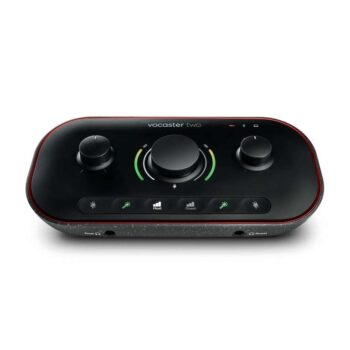
This is a great USB interface for connecting XLR microphones to your computer – it can take two microphones and can automate things like gain, but you can also control them yourself if youre confident in doing so. It also has a mute button, which Ive found to be incredibly useful when using this for work calls over Teams and Zoom.
If you dont need a second mic input, you can also get the Vocaster One with microphone, headphones, and XLR cable for the same price with the same code
Both of these are insane deals if you want to improve your audio for not too much money
Start your podcast in moments with the Focusrite Vocaster Two Podcast Interface for two people and easily take the quality of your content to the next level. This portable podcast interface turns your computer or USB-C iPad into a powerful and intuitive content creation station, with auto-gain for any microphone type, built-in sound enhancements at the touch of a button, and a smart selection of podcast central software.
Focusrite Vocaster Two Podcast Interface Key Features:
Podcasting, vlogging and creating content
USB-C for Mac/Windows/iPad
2 High-gain microphone amplifiers with automatic amplification
2 Headphone and stereo monitor outputs
Guest and/or telephone audio via Bluetooth or TRRS
TRS camera output
Add computer audio via LoopBack
Voice Presets, Easy Start & Mute Button
Phantom power for condenser microphones
Powered by USB or external USB power supply
Expanded Focusrite Vocaster Two Podcast Interface Key Features:
Studio sound in seconds
Auto Gain sets your levels with the click of a button, with more than enough gain on tap for the most popular broadcast mics no booster needed. The Enhance button reveals the true quality of your voice. Four podcaster-approved presets bring out the best in any voice in one click, and you can customise your own with Vocaster Hub. Dont let coughs and sneezes or any other unexpected interruptions mess up your podcast. Hit the mute button and silence the mic until youre ready to go again.
Add a professional touch
Stream pre-recorded segments such as intros, outros, calls or any other audio you can think of from your computer with two sets of stereo loopback. Keep the story going and sound just like youre in a broadcast studio. Youre one cable away from adding Vocasters studio sound to your vlog. No need to sync up in post, just plug in and hit the red button.
Its your call
Bring in guests over the phone with one cable and capture the whole conversation, or record high-quality music or other audio from your device, seamlessly. Connect Vocaster to your computer through USB-C to record into the podcast recording software of your choice, and access Vocaster Hub to customise your sound. Impress your colleagues with broadcast-quality audio by selecting Vocaster as your audio input on Zoom, Skype, and Teams. Use the Host XLR input for your microphone and connect your headphones to the Host output at the front of the interface to avoid feedback or echo.
Your very own control room
Get your show sounding great with Vocasters mixer. Just like a broadcast studio, Vocaster Hub lets you set your levels, enhance your sound, route audio from your phone and computer, and more. Use Enhance Edit to open up greater control of the Compression, EQ, and Rumble Reduction for each preset. Hear exactly what your listeners will hear with Show Mix even without your computer.
Simple setup for two-person podcasts
Connect Vocaster to your computer through USB-C to record into the recording software of your choice, and access Vocaster Hub to customise your sound. Vocaster Two is perfect for a two-person podcast, simply use the Host and Guest XLR inputs for your microphones, and connect your headphones to the Host and Guest output at the front of the interface to avoid any feedback or echo. Expanding on the simple setup, you can use the two loopback channels via your computer to bring in any audio, and connect your monitors, DSLR camera, and mobile phone. Vocaster Two is perfect for a two-person podcast and if two people are streaming or vlogging. You can mix and edit your audio, record broadcast-quality audio straight to your video or live stream, and call in guests or bring in other sound sources through your device. Bluetooth connectivity enables you to use any device as a soundboard for your content.
Whats in the box
1 x Vocaster Two audio interface
1 x USB-C to USB-A cable
Hindenburg Lite software
6 months Hindenburg Pro software
6 months Acast Influencer software
3 months SquadCast Pro Video